
What Is SSH and How Does It Work?
Learn what SSH is, how it enables secure remote access, and why it is essential for managing modern servers.
1. Introduction
Picture this: you’re sitting on your couch in your pajamas, laptop balanced on your knees, coffee going lukewarm beside you. With a few keystrokes, you just took full control of a massive, humming server sitting in a data center thousands of kilometers away — maybe in Singapore, maybe in Virginia, you don’t even know exactly where. You can restart it, install software on it, peek at its files, or shut it down entirely. All from your couch. In your pajamas.
That’s not magic. Well, okay, it kind of feels like magic. But it has a name: SSH. It’s the invisible, heavily armored tunnel that lets you reach out and touch a computer you’ll probably never physically see, without anyone in between snooping on what you’re doing. Every developer, every sysadmin, every cloud engineer uses it dozens of times a day, often without a second thought. Let’s pull back the curtain and see how this everyday miracle actually works [web:7][web:8].
2. What Is SSH?
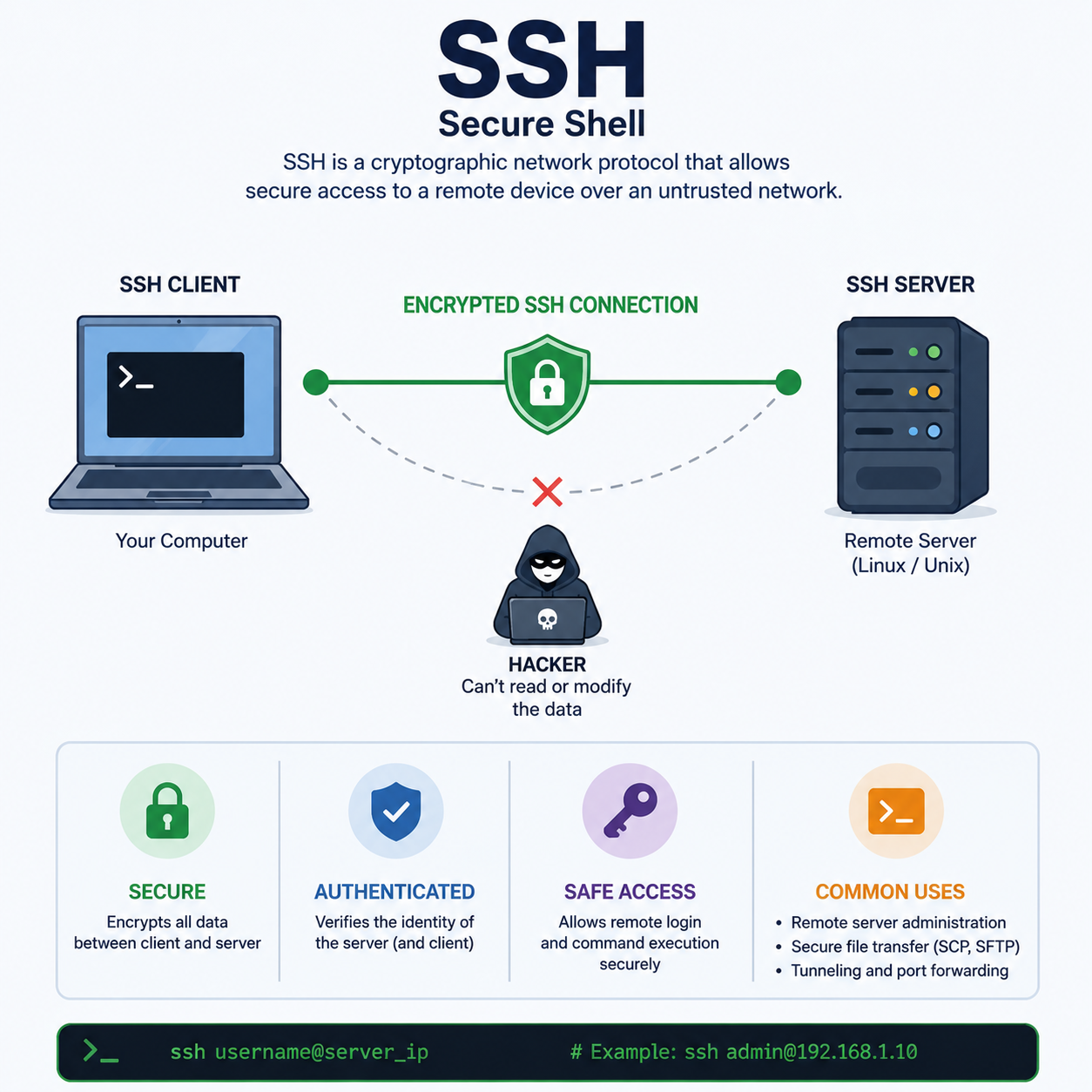
SSH stands for Secure Shell, and it’s basically a protocol — a set of agreed-upon rules — that lets one computer connect to and control another computer over a network, securely.
Here’s the analogy: imagine two bank vaults in different cities. Now imagine someone builds an armored, soundproof underground tunnel connecting them directly. You can walk from Vault A to Vault B carrying gold bars, secret documents, whatever you like, and nobody standing on the street above has any idea what’s happening down there. They can’t see it, they can’t hear it, and even if they somehow drilled into the tunnel, everything inside is scrambled nonsense to them.
That’s SSH. It creates an encrypted tunnel between your computer (the client) and the remote server, so that commands, files, and passwords traveling through it are completely unreadable to anyone eavesdropping on the network in between [web:2][web:8].
3. Why Do We Need SSH?
Before SSH became the standard, people used a protocol called Telnet to connect to remote machines. Telnet worked fine — right up until you remembered that it sent everything, including your username and password, as plain, unencrypted text.
Think about what that actually means: it’s the equivalent of writing your bank password on a postcard and handing it to a random mailman, who then hands it to another mailman, who hands it to another, until it reaches its destination. Every single person who touches that postcard along the way can read exactly what’s on it. On an open network, “every single person” could include a bored hacker with basic sniffing tools sitting on the same Wi-Fi at a coffee shop.
SSH fixed this glaring problem by encrypting the entire session from the moment the connection starts. No more postcards. No more mailmen reading your secrets. Just a sealed, tamper-evident envelope that only the intended recipient can open [web:2][web:5].
4. How SSH Works
At a high level, SSH runs on a simple relationship: your machine is the client, and the remote machine you’re connecting to is the server. When you type a connection command, your client reaches out to the server, and the two of them negotiate how they’re going to talk securely before a single real command is exchanged.
To pull this off, SSH leans on three flavors of cryptography working as a team:
- Symmetric encryption: one shared secret key that both sides use to lock and unlock the data flowing between them. It’s fast, which is why it handles the actual bulk of the conversation once the connection is set up [web:2][web:4].
- Asymmetric encryption: a pair of mathematically linked keys — a public one and a private one. This is used at the start of the connection to safely agree on that shared secret, and to prove identity, without ever transmitting a secret key in the open [web:7][web:8].
- Hashing: a one-way mathematical fingerprint used to check that data hasn’t been tampered with in transit. If even a single bit changes en route, the fingerprint changes too, and SSH knows something’s wrong.
None of these methods alone would be enough. Symmetric encryption is fast but needs a safe way to share the key. Asymmetric encryption is safe but too slow for heavy data. So SSH uses asymmetric crypto briefly to set things up, then switches to symmetric crypto to do the heavy lifting, while hashing quietly checks everyone’s work in the background [web:5][web:8].
5. The SSH Process
Here’s what’s really happening during that boring-looking moment when your terminal says “Connecting…”
Step 1: The introduction. Your client says, “Hey, I’d like to talk,” and the server replies with its own public key so both sides can verify who they’re dealing with. This is like walking up to a club and the bouncer flashing his badge first, so you know you’re not about to hand your ID to a random guy in a trench coat.
Step 2: The secret handshake. Client and server run a quick negotiation (using algorithms like Diffie-Hellman) to agree on a shared symmetric session key, without ever actually sending that key across the network in a form anyone could steal. It’s the cryptographic equivalent of two people shouting numbers across a crowded room and somehow both ending up with the same secret answer, while everyone else in the room has no clue what it is [web:7].
Step 3: The VIP pass check. Now it’s time for you to prove you are who you say you are. This is where SSH keys come in. Think of the server as an exclusive VIP club, and your private key is your one-of-a-kind, unforgeable VIP pass. You never hand your actual pass to the bouncer — instead, you use it to sign a challenge, proving you hold the pass without ever letting it leave your pocket. The bouncer (the server) checks that signature against your public key, which it already has on file from when you were added to the guest list. If it matches, you’re in. No password shouted across the room required [web:7][web:8].
Step 4: Encrypted small talk, forever. Once you’re authenticated, every command you type, every file you transfer, and every response the server sends back is wrapped in that symmetric encryption from Step 2. From the outside, it’s just an unreadable stream of gibberish.
6. Common SSH Problems
Even magic tunnels have off days. A few classics you’ll run into:
- Connection timed out: You knock, and nobody answers. Usually means the server is down, a firewall is blocking port 22, or you fat-fingered the IP address. The server is basically ghosting you.
- Permission denied (publickey): The bouncer doesn’t recognize your VIP pass. Either your public key isn’t registered on the server, you’re using the wrong private key, or your file permissions on the key are too loose (SSH is picky and will straight-up refuse a private key file that “anyone” can read).
- Losing your private key: This is the digital equivalent of losing the only key to your house, except there’s no locksmith to call. If key-only login is enabled and you have no backup or alternate access, you’re locked out of your own server. Moral of the story: always keep a secure backup of your private keys, and ideally a break-glass admin account too.
7. SSH Security
Because SSH is the front door to so many servers, it’s also one of the most heavily attacked services on the internet. The moment a server with an open port 22 goes live, automated bots start scanning it within minutes, trying thousands of common username-and-password combinations per minute — a brute-force attack. It’s less “elite hacker in a hoodie” and more “robot vacuum bumping into the same wall over and over, except the wall is your login prompt” [web:9][web:11].
The good news: defending against this doesn’t require black magic, just some sensible hardening:
- Disable password logins entirely and require key-based authentication instead — since brute-forcing a 2048-bit-plus cryptographic key is computationally hopeless for an attacker [web:12].
- Use Fail2Ban or similar tools, which watch the server’s logs and automatically block any IP address that racks up too many failed login attempts within a short time window [web:9][web:11].
- Move SSH off the default port 22 to a custom port, which won’t stop a determined attacker but dramatically cuts down the noise from lazy, automated scanners [web:6][web:10].
- Disable root login directly, forcing anyone in to use a regular account first, adding one more speed bump for attackers.
None of these are silver bullets on their own, but layered together, they turn your server from an easy target into a very unappealing one [web:14].
8. Conclusion
SSH is the quiet workhorse behind almost every remote server interaction in the modern tech world. It replaced Telnet’s postcard-level security with an encrypted, authenticated, tamper-proof tunnel, and it does it using a clever tag-team of symmetric encryption, asymmetric encryption, and hashing — all wrapped up in a “secret handshake” that happens in the blink of an eye every time you connect.
For developers and sysadmins, it’s simply non-negotiable: it’s how you manage servers, deploy code, and fix things at 2 AM without ever leaving your desk. And here’s the best part — the next time you open a terminal, type ssh user@server, and watch that command prompt light up with a remote shell, you can lean back and enjoy the fact that you now look exactly like a hacker from a 90s movie. Green text optional. Sunglasses indoors, entirely up to you.