
What Is DHCP and How Does It Work?
Learn what DHCP is, how it assigns IP addresses, and why it is essential for modern networks.
Introduction
Picture this. You walk into a cafe, order your usual, and sit down. You tap on the Wi-Fi name, type in a password, and… boom. You’re online. No forms, no settings menus, no phone call to your internet provider begging for permission to exist on their network.
It feels like magic. It is not magic. It’s a quiet little protocol working behind the scenes, handing your phone an internet address faster than the barista can spell your name wrong on a cup.
That protocol is called DHCP, and it deserves way more credit than it gets. So let’s give it its moment in the spotlight.
What Is DHCP?
DHCP stands for Dynamic Host Configuration Protocol, which is a mouthful, so nobody actually says that out loud. Everyone just says “DHCP” and moves on with their lives.
In plain English, DHCP is the system that automatically hands out IP addresses to devices when they join a network. An IP address is basically your device’s mailing address on the internet — without one, your phone can’t send or receive any data, and it just sits there feeling lost and unloved.
Here’s a good way to picture it: think of the DHCP server as the host at a busy restaurant. Guests (your devices) walk in the door, and instead of wandering around trying to find their own seats, the host greets them, checks what’s open, and says, “Table 14, right this way.” No two guests get the same table at the same time. Everyone gets seated fast, and nobody has to think about it.
That host is doing exactly what a DHCP server does for every phone, laptop, and smart fridge that joins your Wi-Fi.
Why Do We Need DHCP?
Now imagine that restaurant with no host. Guests just wander in and grab whatever table looks empty. Two parties sit down at Table 14 at the same time. Chaos. Awkward eye contact. Someone’s soup gets cold.
That’s basically what a network without DHCP would look like, except instead of soup, it’s your internet connection.
Before DHCP became standard, network addresses were assigned manually — a method known as static IP addressing. Someone, usually an overworked IT person, had to sit down and type in a unique address for every single device on the network. By hand. One at a time.
Now think about your home today: your phone, your laptop, your smart TV, your partner’s phone, the robot vacuum, the smart speaker that’s definitely listening to you, and the doorbell camera. That’s potentially eight or more devices, all needing their own unique address, all typed in perfectly, with zero typos allowed. Get one digit wrong and you’ve got two devices arguing over the same address like siblings fighting over the last slice of pizza.
DHCP eliminates all of that. It:
- Saves enormous amounts of time by assigning addresses automatically
- Prevents human error, like accidentally giving two devices the same address
- Makes networks scalable, so adding a hundred new devices is no harder than adding one
In short, DHCP took a tedious manual chore and turned it into something that just… happens. Silently. Reliably. In the background, like a good roommate who does the dishes before you even notice they’re dirty.
How DHCP Works
At a high level, DHCP runs on a simple relationship: a client (your device) asks for an address, and a server (usually built into your router) hands one out. This is the classic client-server setup that powers a huge chunk of how the internet works.
Here’s the part that surprises a lot of people: you don’t actually own your IP address. You’re leasing it.
Think of it like renting an Airbnb instead of buying a house. When your device joins a network, the DHCP server doesn’t permanently assign you an address — it loans you one for a set period of time, called a lease. As long as you’re connected and active, you keep your address. But when the lease is up, or when you leave the network, that address goes back into the pool so someone else can use it.
This is actually brilliant for efficiency. Not every device is online all the time, so instead of permanently reserving an address for your phone even while it’s sitting in your pocket at work, the network can reuse that address for other devices when you’re not around. Everybody shares the pool. Nobody hoards the good tables.
The DHCP Process
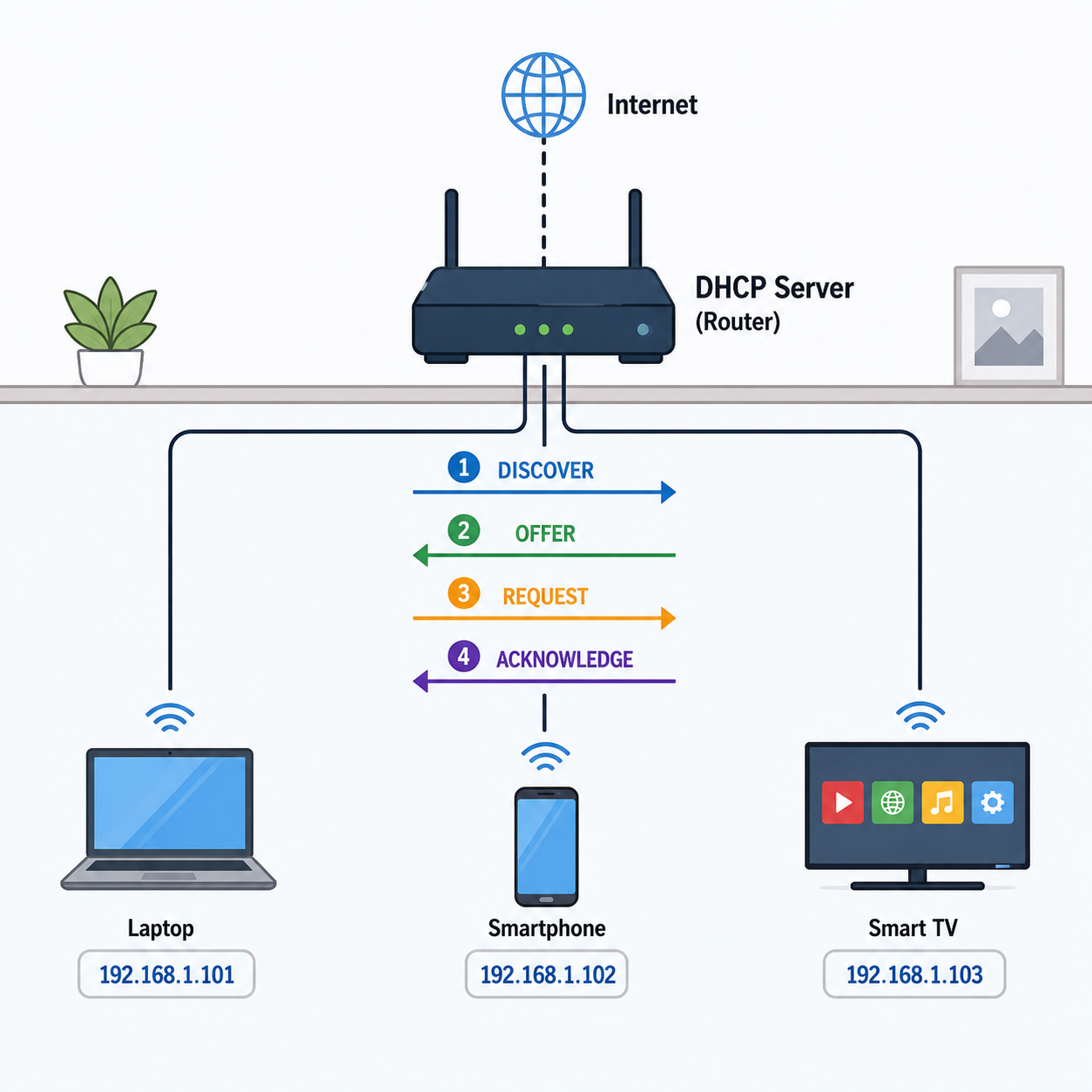
The actual handshake between your device and the DHCP server follows four steps, affectionately known by the acronym D.O.R.A.: Discover, Offer, Request, Acknowledge.
Let’s dramatize it as a conversation between your smartphone and your router, because why not.
1. Discover Your phone joins the Wi-Fi and immediately shouts into the void: “Hey! Is there a DHCP server around? I need an IP address, and I need it now!” This message goes out to basically everyone on the network, because your phone doesn’t know the server’s address yet. It’s the digital equivalent of walking into a room and yelling “does anyone have a charger?”
2. Offer The router, playing the role of DHCP server, hears the request and responds: “I’ve got you. Here’s an available address — how about 192.168.1.42? Also, here’s your subnet mask and gateway info, free of charge.” This is the Offer.
3. Request Your phone, relieved someone finally answered, replies: “Great, I’ll take it! Please officially give me 192.168.1.42.” This step confirms the phone is accepting the offered address, since technically more than one server could have responded.
4. Acknowledge The router finalizes the deal: “Done. That address is yours for the next 24 hours. Enjoy your internet.” This is the Acknowledgment, and just like that, your phone is online, checking notifications before you’ve even sat down.
All of this happens in a fraction of a second. Faster than you can unlock your phone. DHCP is basically the fastest customer service rep you’ll ever interact with.
Common DHCP Problems
DHCP is reliable, but it’s not immune to the occasional bad day. A few common hiccups:
IP Address Conflicts Sometimes two devices end up claiming the same IP address, usually because a device kept an old address from a static configuration or reconnected in a weird way. The result is a network squabble — both devices may lose connectivity or behave unpredictably. It’s the digital version of two people showing up to a party in the exact same outfit. Awkward, but usually resolved by restarting the device or letting DHCP sort it out again.
The DHCP Server Going Down If the DHCP server itself crashes or stops responding — imagine our restaurant host falling asleep at the podium — new devices can’t get an address at all. They’ll sit there, connected to the Wi-Fi but with no actual internet access, silently screaming into the void with nobody answering. Existing devices with an active lease usually keep working for a while, but nobody new can get seated until the host wakes up.
Address Pool Exhaustion Every DHCP server only has a limited number of addresses to hand out. On a huge network with tons of devices, it’s possible to simply run out. It’s like a restaurant with only 20 tables trying to seat 200 people — eventually, someone’s waiting outside in the rain.
Thankfully, most of these issues resolve themselves once the server catches up, leases expire, or someone reboots the router (the tried-and-true IT solution to roughly 90% of all problems).
DHCP Security
Here’s where things get a little spooky. DHCP is trusting by nature — it assumes any server that answers a request is legitimate. That trust can be exploited.
Enter the Rogue DHCP Server. This is when an attacker sets up their own unauthorized DHCP server on a network. Since your device just wants any answer to its Discover message, it might accept an offer from this fake server instead of the real one. The rogue server can then hand out its own settings, quietly rerouting your traffic through the attacker’s system. This is often called DHCP spoofing, and it’s a sneaky way to intercept data or redirect users to malicious sites, all while everything looks completely normal on the surface.
It’s a bit like an imposter sneaking into the restaurant, putting on a host’s uniform, and start seating guests at tables that just so happen to be bugged.
The good news: network admins have solid defenses against this. Business networks commonly use a feature called DHCP snooping, which essentially tells network switches, “Only trust DHCP offers coming from this one approved port — ignore everyone else.” It’s a bouncer checking IDs at the door, making sure only the real host gets to seat anybody. There’s no need to get lost in enterprise jargon here — just know that this protection exists, and it’s a standard part of keeping business networks safe.
Conclusion
DHCP might be one of the least glamorous protocols on the internet, but it’s doing an enormous amount of invisible work. It hands out addresses, prevents chaos, saves IT departments from a lifetime of manual data entry, and gets your phone online before you’ve even finished sitting down.
So next time you connect to Wi-Fi without lifting a finger, take a second to appreciate your router. It’s out there, playing host, seating every device at exactly the right table, one lease at a time.