
Think of DNS (Domain Name System) as the internet’s phonebook.
Computers don’t understand names like google.com or netflix.com; they only understand numbers, specifically IP addresses like 142.250.190.46.
If DNS didn’t exist, the internet would look like a giant spreadsheet of numbers. You’d have to memorize a string of random digits just to visit a website.
DNS saves us from that nightmare by translating human-readable domain names into machine-readable IP addresses.
How DNS Works: The Journey of a Click
When you type a URL into your browser, it triggers a lightning-fast relay race behind the scenes.
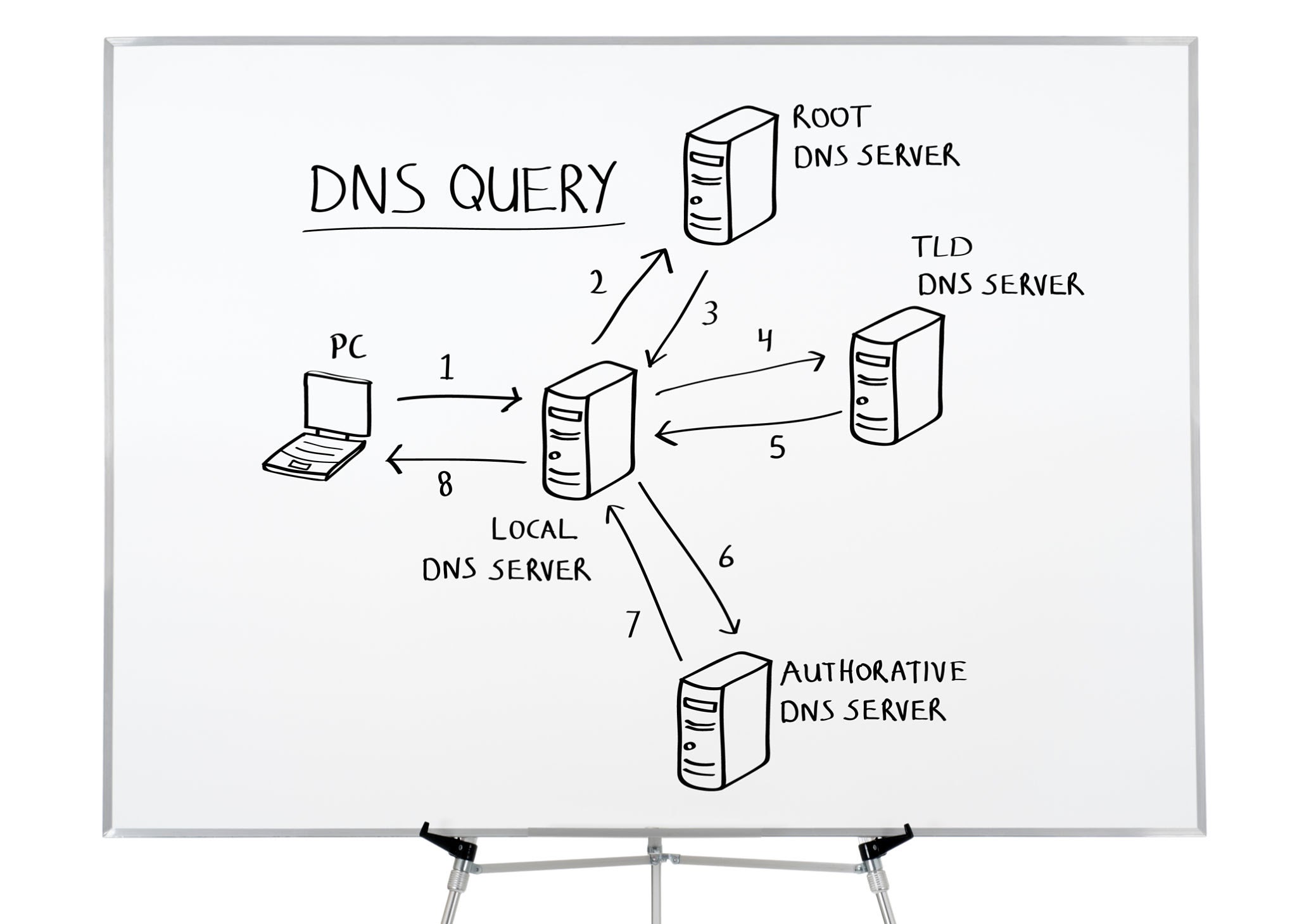
Here are the four main players involved in fetching the right IP address:
-
The DNS Resolver (Your Librarian): This is usually operated by your Internet Service Provider (ISP). It receives your request and checks its local memory (cache) first. If it doesn’t know the answer, it asks the next server.
-
The Root Server (The Switchboard): The resolver asks the root server, which doesn’t know the exact IP address, but knows exactly who to ask. It directs the resolver to the specific server handling that domain ending (like
.comor.org). -
The TLD Server (The Section Manager): The Top-Level Domain server holds information for domains sharing a common extension. If you searched for a
.com, the TLD server points the resolver to the final stop. -
The Authoritative Nameserver (The Boss): This server has the final say. It holds the actual DNS records for the specific domain you requested. It returns the answer to your resolver, which gives it to your browser, and the website loads.
All of this happens in milliseconds.
How DNS Is Configured
You interact with DNS configuration more often than you might think:
-
Automatic (DHCP): When you connect to Wi-Fi, your router can automatically provide DNS server information to your device.
-
Manual/Custom: You can manually change your DNS resolver. Popular public DNS services include Google Public DNS (
8.8.8.8) and Cloudflare DNS (1.1.1.1). -
Enterprise: Businesses can operate internal DNS servers to manage local network resources, internal applications, and intranet sites.
The Dark Side: How Hackers Exploit DNS
Because DNS was originally designed decades ago for a much smaller internet, security was not the same priority it is today.
DNS remains an important target for attackers.
| Attack Type | How It Works | The Hacker’s Goal |
|---|---|---|
| DNS Spoofing (Cache Poisoning) | Attackers attempt to place false DNS information into a resolver’s cache. A victim can then be redirected to a malicious destination. | Steal credentials, payment information, or distribute malware. |
| DNS Amplification (DDoS) | An attacker abuses DNS servers to generate a much larger response toward a spoofed victim address. | Overwhelm a website, server, or network with traffic. |
| DNS Tunneling | Data or command traffic can be encoded inside DNS queries to bypass network controls. | Data exfiltration or command-and-control communication. |
| DNS Hijacking | An attacker compromises a device, router, account, or DNS configuration and changes where DNS requests are directed. | Redirect traffic, phishing, advertising, or other malicious activity. |
How to Secure DNS and Prevent Attacks
Securing the internet’s phonebook requires action from both website owners and everyday users.
For Everyday Users
-
Choose a reputable DNS provider: You can use public resolvers such as Cloudflare (
1.1.1.1) or Quad9 (9.9.9.9). -
Secure Your Router: Change the default administrator password on your home router and keep its firmware updated.
-
Use DNS over HTTPS (DoH): DoH encrypts DNS queries between your device and the DNS resolver, helping protect DNS requests from being observed or modified on the network.
For Website Owners and IT Administrators
-
Enable DNSSEC (DNS Security Extensions): DNSSEC uses digital signatures to help validate DNS responses and protect against certain forms of DNS tampering.
-
Use Rate Limiting: Appropriate rate limiting can reduce the impact of abusive DNS traffic and help mitigate certain attacks.
-
Enable Two-Factor Authentication (2FA): Protect domain registrar and DNS-management accounts with strong authentication. A compromised registrar account can allow an attacker to change DNS settings.
Conclusion
DNS is one of the fundamental systems that makes the modern internet usable.
Instead of remembering IP addresses, we can simply type a domain name and let DNS handle the translation.
Understanding DNS is useful for everyone working with IT, networking, cloud infrastructure, or cybersecurity because DNS sits at the intersection of all of them.