
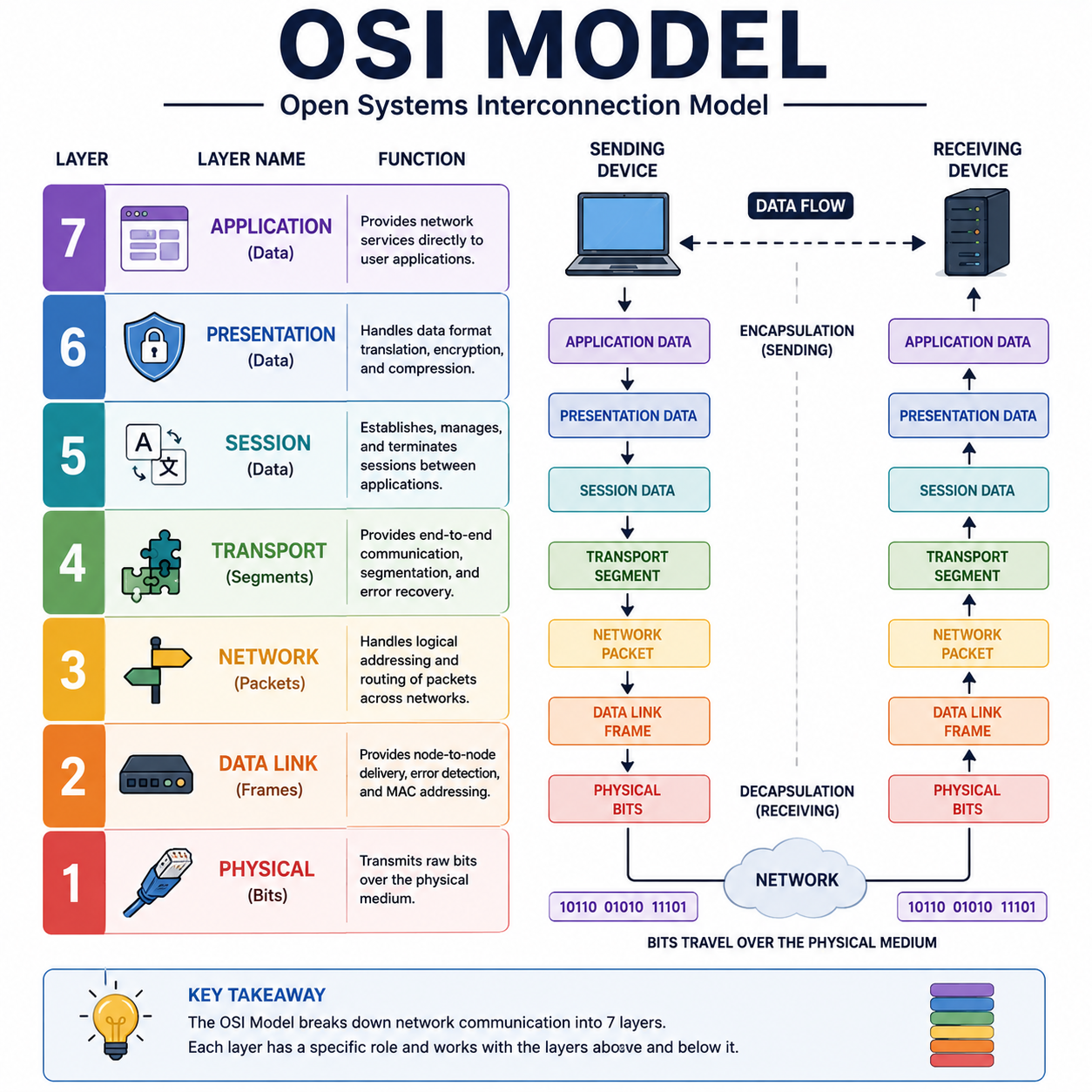
The Internet’s Secret Rulebook: A Non-Boring Guide to the OSI Model
1. Introduction (The Magic of Hitting “Send”)
You’re on the couch. You type “you HAVE to see this cat falling off a Roomba” into a chat, hit send, and two seconds later your friend is cackling three states away.
You didn’t think about it. You didn’t need to. But behind that one tiny tap, your data just went on a wild, split-second road trip — chopped into pieces, stamped with addresses, launched across cables and radio waves, and reassembled perfectly on the other end, in order, without a single typo.
That entire invisible journey runs on a rulebook. Nobody voted on it in a group chat — it’s called the OSI Model, and it’s been quietly running the show since the late 1970s. It’s the unsung hero of literally every internet interaction you’ve ever had, and it’s never once asked for credit.
2. What Is the OSI Model? (The Definition & Analogy)
OSI stands for Open Systems Interconnection. It’s a conceptual framework — basically a 7-step instruction manual — that describes how data gets packaged, addressed, sent, and unpacked so two completely different devices can actually understand each other.
Think of it like mailing a gift. You don’t just chuck a loose sweater into the postal system and hope for the best. You:
- Pick the gift (your data)
- Wrap it and add a card (formatting)
- Put it in a box, seal it, address it (packaging + addressing)
- Hand it to a courier who slaps a barcode on it (routing)
- It rides a truck, then a plane, then another truck (physical transport)
- On the other end, it gets unboxed in reverse order until your friend is holding a sweater, not a barcode The OSI Model is that same layered “wrap it, address it, ship it, unwrap it” logic — just for data instead of sweaters.
3. Why Do We Need It? (The “Dark Ages” of Networking)
Rewind to the late 1970s and early 80s. Every major tech company was basically speaking its own made-up language.
IBM had its own networking approach. So did the emerging Apple world. So did a dozen other vendors, each convinced their way was the way.
It was less “global internet” and more “a bunch of walled-off tech tribes yelling into their own separate phone lines.” An IBM machine trying to talk to a competitor’s system was like a Italian chef trying to take an order from a customer who only speaks Klingon — technically both are communicating, but nothing useful is happening.
So in 1984, the International Organization for Standardization (ISO) stepped in and basically said: “Everyone, stop. Here’s one universal rulebook, in seven parts, that any device from any vendor can follow.” That rulebook is the OSI Model — and it’s the reason your Android phone can talk to a website hosted on servers running who-knows-what, without either of them needing to know or care what’s on the other end.
4. How Does It Work? (Meet the 7 Layers)
Data travels down the stack when it’s sent, and up the stack when it’s received. Each layer adds its own little “wrapper” of info as it goes down — this is called encapsulation. On the receiving end, each layer peels off its matching wrapper — that’s decapsulation.
The classic mnemonic (top to bottom, Layer 7 to Layer 1): “Please Do Not Throw Sausage Pizza Away.”
| Layer | Name | What It Actually Does | Real-World Analogy |
|---|---|---|---|
| 7 | Application | Where you interact — apps, browsers, email clients | The customer placing the order |
| 6 | Presentation | Translates, encrypts, and formats data so it’s readable | The translator/waiter converting your order into kitchen-speak |
| 5 | Session | Opens, manages, and closes the connection between devices | The reservation that keeps your table open all night |
| 4 | Transport | Breaks data into chunks, makes sure it all arrives, in order | The delivery service tracking every box |
| 3 | Network | Figures out the best route across networks (IP addresses live here) | The GPS picking the route |
| 2 | Data Link | Handles device-to-device delivery on the same local network (MAC addresses) | The local mail carrier who knows your street |
| 1 | Physical | The actual cables, radio waves, and electrical signals | The literal road the truck drives on |
Here’s the assembly line, dramatized:
Layer 7: “Send this cat video!” Layer 6: “Cool, let me format and maybe encrypt that for you.” Layer 5: “I’ll keep this conversation open so we don’t have to start over.” Layer 4: “Chopping this into numbered chunks so nothing gets lost.” Layer 3: “Here’s the address it needs to travel to.” Layer 2: “Here’s the exact local device to hand it to next.” Layer 1: “Alright, turning this into actual electrical signals. GO.”
On the receiving end, the whole conversation runs in reverse, layer by layer, until your friend’s phone just… shows a cat falling off a Roomba. No drama. No wrapper paper left lying around.
5. The Dark Side: Security & Hacking Across the Layers
Here’s the thing most people don’t realize: hackers don’t attack “the network.” They target specific layers, like picking a specific lock instead of just kicking the whole door.
- Layer 7 (Application): This is where DDoS attacks love to hang out. Attackers flood a website with so many fake requests that the app collapses under the weight — like 10,000 people “ordering” at once just to jam the kitchen, not because they’re actually hungry.
- Layer 2 (Data Link): Attackers can pull off MAC spoofing — basically forging the “local address” of a device so a network mistakes an attacker’s laptop for a trusted one, letting them eavesdrop on local traffic.
- Layer 3 (Network): IP spoofing fakes the “from” address on data packets, tricking systems into trusting traffic that’s actually coming from somewhere shady. Worst-case scenario? A full-blown breach where an attacker intercepts sensitive data mid-transit, impersonates a trusted device, or just knocks a service completely offline. Not great for your Tuesday.
6. The Defense: How We Protect the Stack
The good news: security tools are just as layer-specific as the attacks.
- Firewalls mostly patrol Layer 3 and 4, checking IP addresses and ports to decide what traffic is allowed in or out — like a bouncer checking IDs at the door.
- Web Application Firewalls (WAFs) guard Layer 7, filtering out malicious requests before they ever reach your app — the bouncer who also reads minds.
- Encryption (TLS/SSL) operates around Layer 6, scrambling data so even if someone intercepts it, it’s unreadable gibberish.
- Network segmentation and switch security protect Layer 2, making it harder for spoofed devices to blend in with legitimate traffic. Layer by layer, defense by defense — it’s less one giant wall, more a series of checkpoints, each doing its own job.
7. Conclusion
The OSI Model might be mostly theoretical these days — modern networking leans hard on the simpler, real-world TCP/IP model — but it’s still the best mental map we have for understanding why the internet actually works. It turns “magic” into logic, one layer at a time.
And here’s the classic IT joke to leave you with: when something breaks and the network, the hardware, and the software all check out fine? Engineers blame “Layer 8.”
There is no Layer 8. It’s just the user.
You, typing your WiFi password wrong for the fourth time, are the final and most unpredictable layer of the entire OSI Model.